
GPT Image 2.5 is the latest generation of AI image-generation models released by OpenAI on September 8, 2026. According to the company, it offers generation speeds up to 50% faster, sharper details, and ensures that people and products remain consistent even after multiple rounds of editing. The model is available in a consumer version, ChatGPT Images 2.5, as well as two developer API versions: Flare and Sunburst. According to rankings compiled by the third-party website llm-stats, the two API versions claimed the top two spots on LMArena’s image editing blind test rankings the day after their release.
However, impressive official data doesn’t mean there are no controversies. Initial reactions from the community were mixed: some developers praised it as “a huge step forward” after testing it, while others questioned the lack of transparency regarding token consumption and inconsistent content moderation standards. This article covers everything from the model’s positioning, core features, user feedback from hands-on testing, real-world use cases, and pricing, all the way to the limitations you need to know before using it—helping you decide whether GPT Image 2.5 is worth incorporating into your workflow.
Instead of reading other people’s reviews, why not open ChatGPT and test the new model’s image-generation capabilities for yourself:
What is GPT Image 2.5? How does it differ from GPT Image 2?
What is the official positioning of GPT Image 2.5?
GPT Image 2.5 is the latest version in OpenAI’s series of image-generation models, with a focus on “reliable editing loops”: starting with a reference image, modifying a single detail while keeping the rest—which is already satisfactory—unchanged, and then continuing to make adjustments without causing image drift. According to Official Announcement from OpenAIThis generation addresses the three major pain points of the previous generation, GPT Image 2—speed, accuracy in rendering people, and consistency across multiple editing rounds—one by one.
Compared to GPT Image 2, which was released in April 2026, the officially listed upgrades include: sharper details, more natural lighting and textures, better preservation of the facial and product features in the reference photos, and a reduction in generation latency of up to 50%. According to A report by 9to5MacThe new model is being rolled out to all ChatGPT, ChatGPT Work, and Codex users across desktop, mobile, and web platforms.
Official ChatGPT Images 2.5 promotional video released by OpenAI
How do I choose between the Flare and Sunburst API versions?
At the API level, GPT Image 2.5 is divided into two distinct models. GPT-Image-2.5 Flare is the default option, delivering higher-quality images with half the latency of GPT Image 2, making it suitable for high-volume daily generation, creator content, and rapid prototyping. GPT-Image-2.5 Sunburst, on the other hand, is designed for high-end visual workflows. While it takes longer to generate images, it offers tighter control over details during multi-round revisions.
A simple way to decide: If you need to produce images quickly, are cost-conscious, or need to generate a large volume of images, choose Flare; if you’re working on brand visuals or product renderings—projects that require iterative fine-tuning without compromising quality—Sunburst’s precision makes the longer wait time worthwhile. Both models now include two new quality levels, “xhigh” and “max,” allowing developers to adjust settings according to their needs.
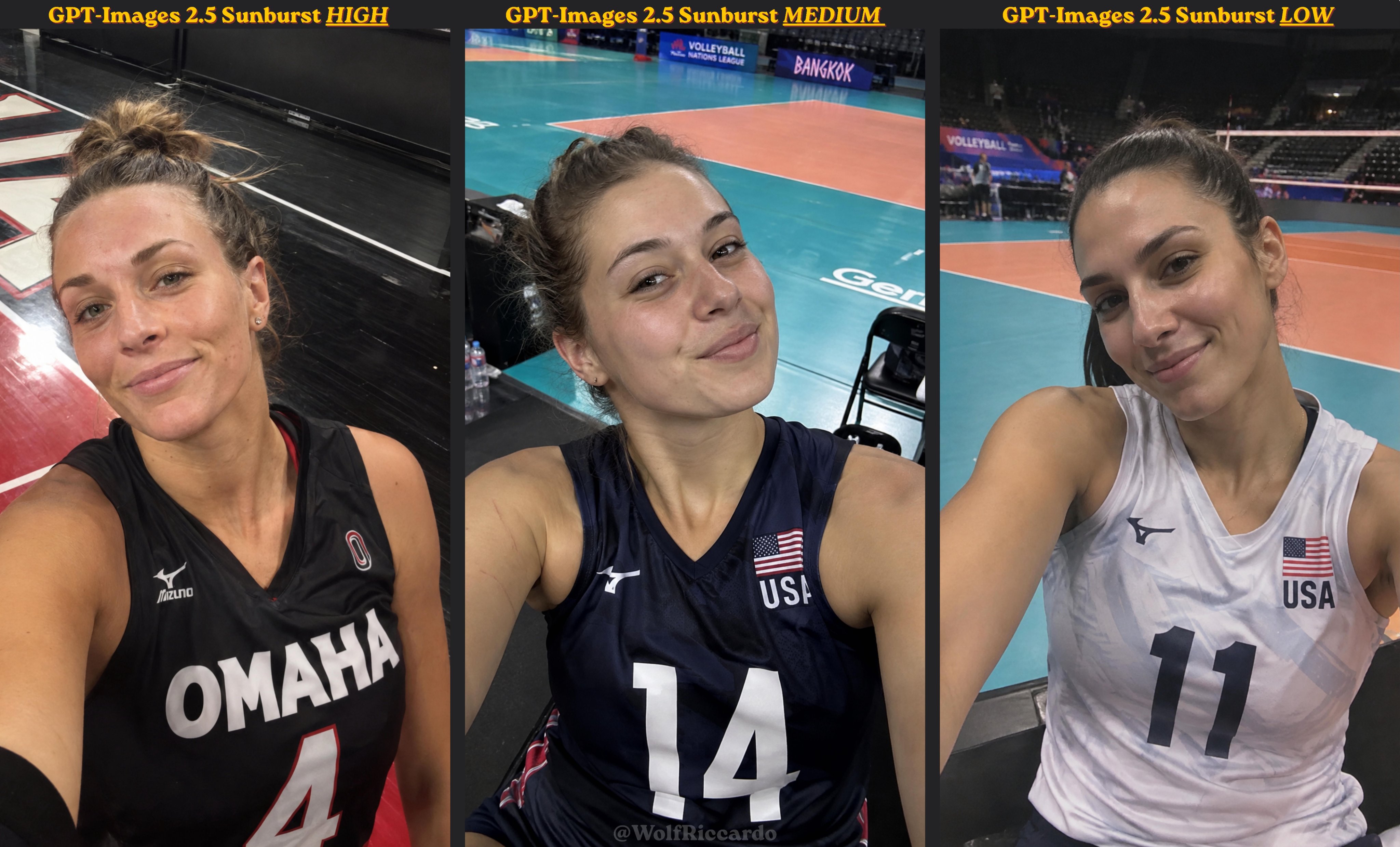
Comparison of Generation Results for GPT-Images 2.5 Sunburst Across Three Quality Levels (High, Medium, Low)
Why does the name “GPT Image 2.5” cause confusion?
In the early days of its release, social media was flooded with comparison images and half-true, half-false rumors, partly due to the name itself. According to Namez Crafter ReviewStrictly speaking, “GPT Image 2.5” is not a single official model name: consumers see it as “ChatGPT Images 2.5” in ChatGPT, while developers use two separate models—Flare and Sunburst—via the API.
This practice of distinguishing between "consumer" and "developer" versions has led many users to believe that the version they are using is the same as the one others are testing, when in fact there may be differences in quality, speed, and pricing. When reading any third-party reviews, the first step to avoiding misinformation is to confirm which variant was tested.
Once you understand how the model is positioned, try generating a few images using a free account—that’s the best way to experience the differences in this generation:
What are the key feature upgrades in GPT Image 2.5?
What improvements have been made in image quality and consistency?
In terms of image quality, GPT Image 2.5 focuses on reducing the “plastic-like” appearance that was often criticized in the previous generation: details such as skin texture, metal reflections, and fabric textures are now closer to real photography, and the transitions between light and shadow are more natural. Text rendering within images has also improved, with a reduced error rate in complex layouts such as poster headlines and product packaging text.
Consistency is the most practical upgrade in this generation. After uploading a reference photo of a person or pet, the subject’s features remain highly preserved even when the background, clothing, or visual style is changed. For creators who need to maintain a consistent character design, this solves the core pain point of the past, where “every time an image was edited, the subject’s appearance would become distorted.” During multiple rounds of editing, previously modified parts will not be accidentally overwritten by new commands.
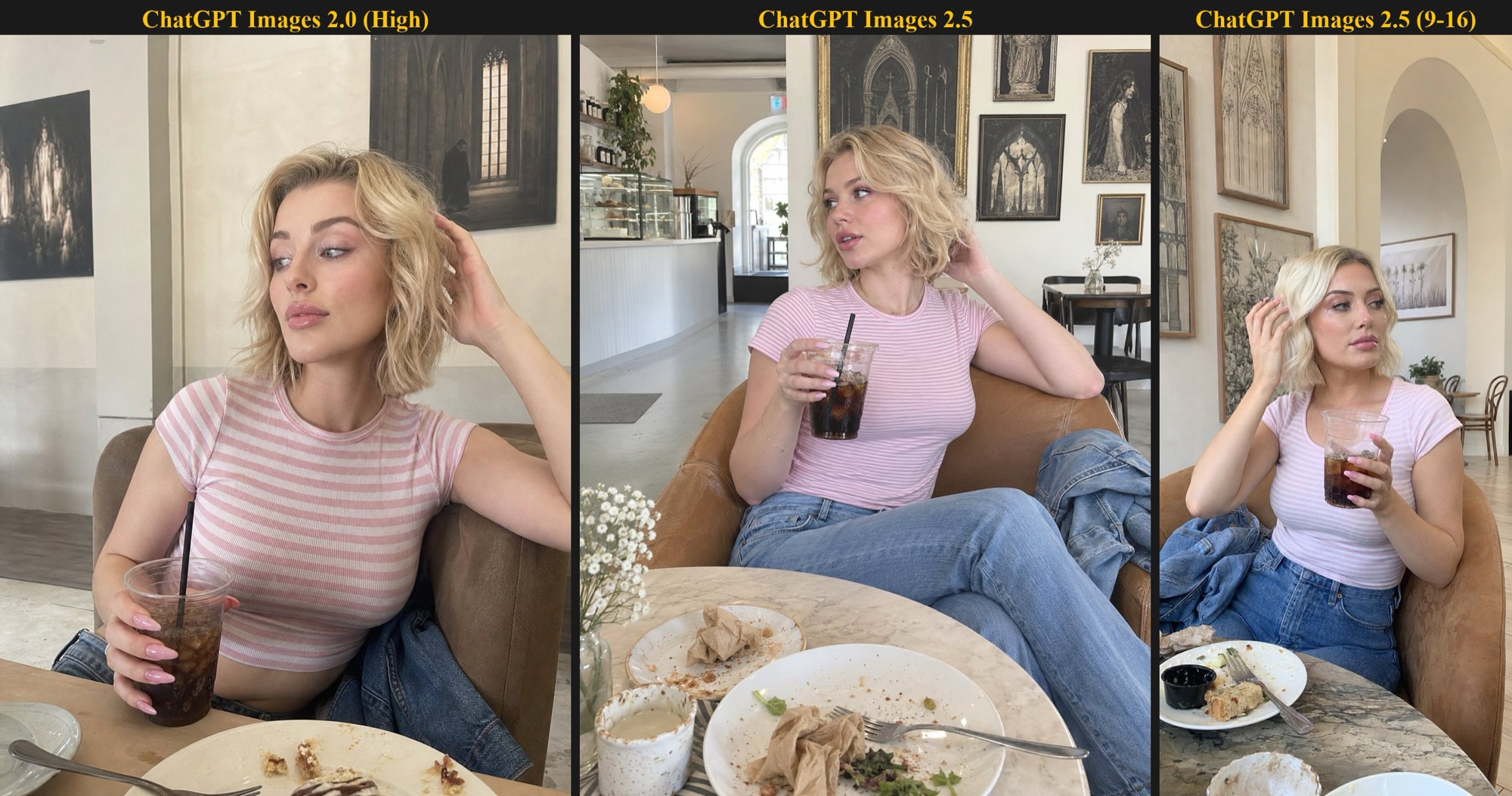
From left to right: ChatGPT Images 2.0 (High), ChatGPT Images 2.5, ChatGPT Images 2.5 (9:16) — a comparison of the same reference person generated by different versions
How does the Sketch feature work?
Sketch is a new drawing tool added to the ChatGPT interface that allows users to hand-draw sketches directly within a conversation to serve as composition references for the final image. You can start by sketching the approximate positions of objects and the layout, then use text to specify style, lighting, and other details. The model will generate a complete image based on the spatial structure of your sketch.
This feature is particularly useful for users who aren’t good at describing layouts in words. In the past, specifying layout requirements such as “place the title in the top-left corner, the product in the bottom-right corner, and leave white space in the middle” using only text prompts often didn’t yield good results; now, by simply drawing it out, the communication effort is significantly reduced.
What are the uses of "Comment" and "Templates"?
Comment-based editing lets you circle a specific area on the generated image and leave a comment; the model will only modify the annotated elements, leaving the rest unchanged. This “point-and-edit” approach is far more precise than a text-based request like “Please edit the third object on the left,” and it is the core experience of what the developers refer to as the “reliable editing loop.”
"Templates" provides ready-made templates for common formats such as posters and product images. After applying a template, users simply need to replace the content, making it ideal for small and medium-sized businesses and creators who need to quickly produce social media graphics or promotional materials. Combined with the consistency of reference images, these two features bring ChatGPT’s image-generation workflow closer than ever to the editing experience of professional design tools.
What have been the actual reactions of netizens and developers to GPT Image 2.5?
What are some of the positive reviews of X on the official forum?
In its official post on X, OpenAI immediately summarized the key features of this update:
ChatGPT Images 2.5—faster, sharper, smarter, with improved creative tools. Faster image generation, more natural and recognizable image fidelity, consistent details across multiple edits, comment-based edits⋯⋯
— @OpenAI,Post a Message
在 Official Announcement Post on the OpenAI Developer ForumFollowing this, Sam Saffron (sam.saffron), co-founder of Discourse, tested Codex’s native support for generating images using a prompt for a complex technical poster and described it as “a big step change.” Other developers, such as safi7yy, called it an “exciting update” and a “major advancement.”
The real-world tests circulating online also focus on two landmark tests: the first is the scrambled Rubik’s Cube mirror reflection test, in which GPT Image 2.5 correctly renders the reflection in the mirror—a detail where nearly all previous image models have failed; second, in stop-motion-style multi-frame images, the characters’ appearances remain consistent.
Where are the criticisms and controversies concentrated?
The negative feedback has primarily come from the developer community and has focused on transparency rather than image quality. Forum user merefield questioned why the official team had not published a comparison of token consumption between the old and new models, making it difficult to estimate costs; veteran community member _j reported that when regenerating images in inference mode, the preview image is “irretrievably” replaced, and pointed out that some billing details are not documented.
Content moderation is another point of contention. Some users have reported that prompts of the same nature are sometimes approved and sometimes rejected, indicating inconsistent standards; Community moderator EricGT suggested that OpenAI provide alternative prompt suggestions when a prompt triggers moderation, rather than rejecting it outright. While these issues do not affect the model’s generative capabilities, they pose practical engineering risks for teams looking to integrate GPT Image 2.5 into their formal product workflows.
What Do the LMArena Blind Test Rankings Reveal?
Early data from third-party blind testing platforms favors GPT Image 2.5. According to a third-party website Rankings compiled by llm-stats(Third-party estimates; not official figures from OpenAI or Google.) As of September 9, 2026, on the Arena image editing leaderboard, Sunburst leads with 1,520 points, followed by Flare with 1,491 points, ahead of Seedream 5.0 Pro (1,394), Google’s Nano Banana Pro (1,390), and Nano Banana 2 (1,387).
However, there are two points to note. First, these scores are based on several thousand votes cast shortly after release and should be viewed as early indicators rather than definitive conclusions. Second, as pointed out in Namez Crafter’s review, on the first day of release, “all quality metrics were derived from OpenAI’s own data,” and independent verification will take time. According to figures released by the third-party blind testing platform Arena, the previous-generation GPT Image 2 swept its rankings by a record-breaking margin of 242 points when it was released in April (see Official Arena Post), It remains to be seen whether GPT Image 2.5 can replicate this dominance—we’ll need to wait for one or two months of voting data to find out.
Raw images are just one part of the AI workflow. If you want to learn how to set up a 24/7 online AI assistant to handle more daily tasks:
What are some practical use cases for GPT Image 2.5?
GPT Image 2.5: Video Demonstration of Actual Generation
How to Create E-commerce Product Images and Advertising Posters?
E-commerce product images are the most direct commercial application of GPT Image 2.5. By uploading real-life product photos as reference images and instructing the model to change the scene, lighting, or color scheme, the product’s appearance remains accurate—which is precisely where older models most often “get the product wrong.” According to Felo's Hands-On ReviewWhen creating posters, enclosing the title text in quotation marks (e.g., “CITY LIGHTS FESTIVAL”) can significantly improve the accuracy of the text rendering.
Recommended workflow: Start by using a clear prompt to define the theme, style, mood, lighting, composition, and dimensions. After generating the first draft, describe the elements that need to be modified one by one, rather than rewriting the entire prompt each time. By using templates, the time required to create a set of social media promotional images can be reduced from several hours to just a few tens of minutes.
How Can Character Consistency and Storyboarding Be Achieved?
Content creators benefit most from character consistency. After uploading character reference images and describing new poses, scenes, or outfits, the character’s facial features and traits remain consistent across images, making it possible for the first time to create multi-panel comics, storyboards, and brand mascot series all in one place within ChatGPT. Taiwanese tech media outlet Grenade’sTutorialsIt also demonstrates the entire process—from character creation and costume modification to action extension—using six prompt examples.
Using Sketch’s features, you can first sketch out rough compositions for each frame, then have the model fill in the details. For YouTubers or advertising teams that need storyboards before filming, this is much faster than outsourcing to a storyboard artist—and costs an order of magnitude less.
What can developers do with the API?
Typical use cases at the API level include: using Flare for high-volume user-generated content (such as avatar generators and product mockup tools), and using Sunburst for design SaaS that requires fine-grained control. GPT Image 2.5 is also natively integrated into Codex, allowing developers to generate technical diagrams, product posters, or UI assets within the same environment where they write code, without having to switch tools.
It is worth noting the role of third-party aggregation platforms. Through OpenRouter Through API gateways, developers can use a unified interface to simultaneously call both GPT Image 2.5 and competing models for A/B testing, and then decide which one to use in production based on quality and cost.
What are the pricing details for GPT Image 2.5? Can free users use it?
What are the image generation permissions for each ChatGPT subscription plan?
For consumers, GPT Image 2.5 has been rolled out to all ChatGPT users, including those on the free plan—the difference lies in generation quotas and speed prioritization. Currently, ChatGPT subscriptions are divided into Free, Go ($8 per month), Plus ($20 per month), Pro ($200 per month), and Business tiers. The higher the paid tier, the larger the image generation quota and the shorter the wait times during peak hours.
For general users, the free version is sufficient for trying out Sketch and the comment editing features; for users with regular graphic design needs (such as creating daily social media graphics), the Plus plan offers the best value for the money.
What are the API fees, and what is the approximate cost per image?
API pricing is identical to that of the previous-generation GPT Image 2: $5 per million tokens for text input, $8 per million tokens for image input, $30 per million tokens for image output, and $2 per million tokens for cache reads. OpenAI has not yet announced the per-image pricing for GPT Image 2.5; actual costs are calculated based on token usage. Please refer to OpenAI’s official pricing page for the most up-to-date rates:OpenAI API Pricing Page。
“More for the same price” is the key message of this release: higher quality and half the latency at the same cost. However, be aware of the issues already pointed out by the developer community—there is no comprehensive documentation regarding the actual token consumption for the newly added xhigh and max quality tiers. Before going live, you should test the costs using your own real-world workloads rather than relying solely on estimates.
MB will continue to track the latest hands-on reviews of AI and Web3 tools. If you don't want to miss future updates, bookmark this page:
Comparison of GPT Image 2.5 and Nano Banana 2
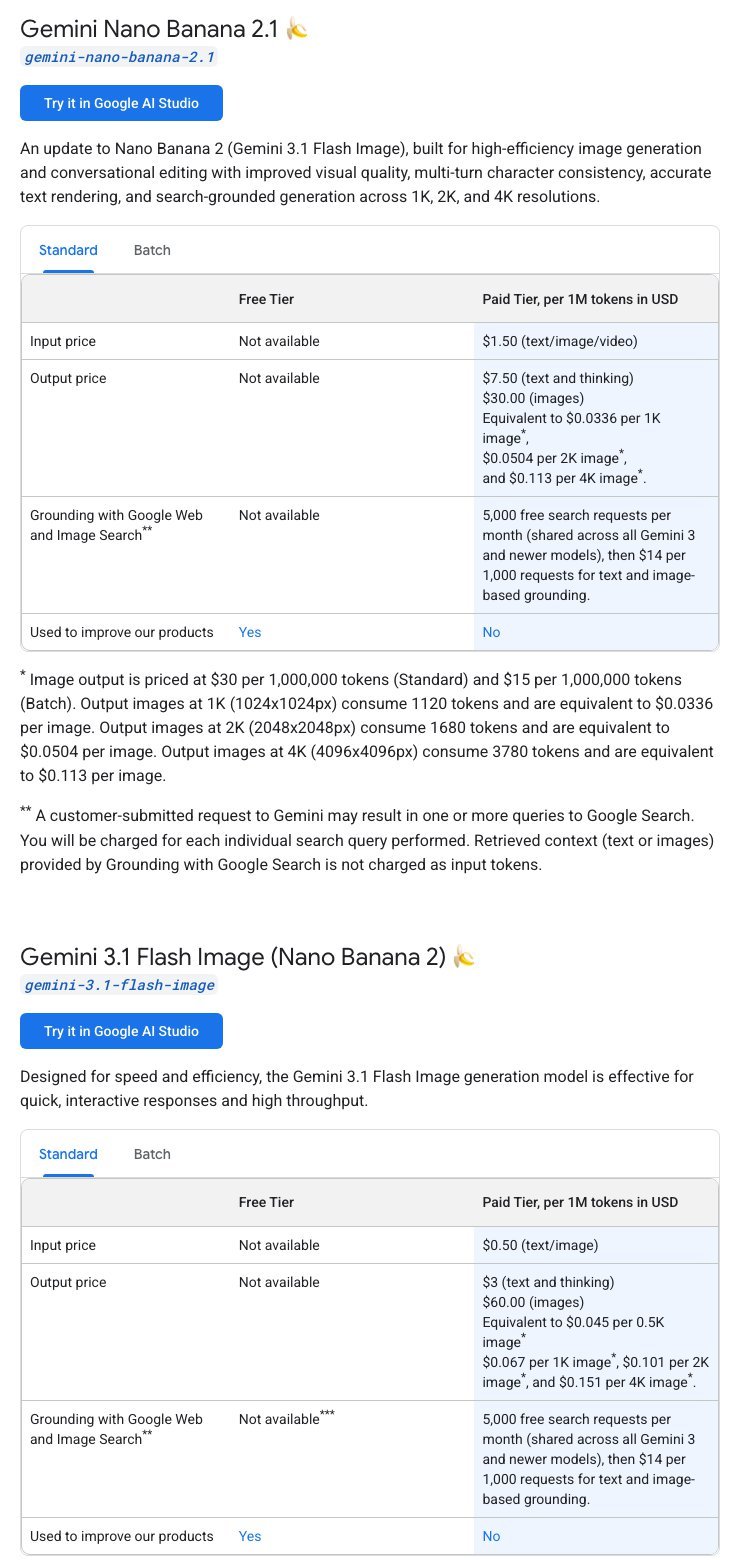
Nano Banana 2 is Google's image generation model; its official name is Gemini 3.1 Flash Image. It was released as a preview on February 26, 2026, and officially launched on May 28 (Official Google Introduction、Gemini API Release Notes). Google subsequently released Nano Banana 2.1 on October 6, 2026, and recommended that developers switch from Nano Banana 2 to the new version; therefore, the table below also includes 2.1 for reference.
Specifications and Pricing Comparison
| Project | GPT Image 2.5 | Nano Banana 2 | Nano Banana 2.1 |
|---|---|---|---|
| Developer | OpenAI | ||
| Release Date | September 8, 2026 | February 26, 2026 (Preview); May 28, 2026 (Official Release) | October 6, 2026 |
| Version | Flare (fast, for everyday use), Sunburst (most powerful, slower) | Single version; a Lite version is also available | Single Version |
| Maximum Resolution | Longest side: 3,840 pixels (approximately 4K); resolutions exceeding 2,560 × 1,440 are experimental | 4K | 4K |
| General User Portal | ChatGPT: All Plans, Including the Free Version | Gemini App (Free Version) | Gemini App Paid Plans (AI Plus, Pro, Ultra) |
| API Fees | Per token: Image output costs $30 per million tokens; the official price per image has not been disclosed. | $0.067 (1K) to $0.151 (4K) per image | $0.0336 (1K) to $0.113 (4K) per image |
| Can it be used directly in Hong Kong? | No (Neither ChatGPT nor the OpenAI API supports Hong Kong.) | The Gemini app works; the Gemini API does not. | The Gemini app works; the Gemini API does not. |
Source:OpenAI GPT Image 2.5 Flare Model Page、OpenAI Image Generation Guide、OpenAI API Pricing、Gemini API Pricing、Gemini Raw Image Description. Prices are listed in U.S. dollars and are subject to change at any time; the prices displayed in real time on the official website are final.
What are the differences in functional orientation?
- GPT Image 2.5: The focus is on the editing workflow within ChatGPT, such as creating sketches, annotating and editing images, and using templates; the API comes in two versions—Flare and Sunburst—allowing users to balance speed and quality.
- Nano Banana 2 and 2.1: Google emphasizes consistency in characters and objects. Nano Banana 2 can maintain consistency for up to 5 characters and 14 objects simultaneously; it also supports rendering and translating text within images, as well as retrieving more up-to-date information via Google Search.
Neither company has released official tests directly comparing the two devices. The blind test rankings circulating online come from third-party websites, and most were published before the release of Nano Banana 2.1, so please keep this in mind when referring to them.
Which one can Hong Kong users use?
This is the biggest difference between the two for Hong Kong readers:
- ChatGPT and the OpenAI API:List of Regions Supported by OpenAIHong Kong is not included, so GPT Image 2.5 cannot be used directly in Hong Kong.
- Gemini App:List of Regions Where the Gemini Web Version Is AvailableThis includes Hong Kong; users in Hong Kong can use the free version of Nano Banana 2 directly;Google AI Subscription PlansIt is also available in Hong Kong, and paying users can use Nano Banana 2.1.
- Gemini API and Google AI Studio:List of Regions Where the Gemini API Is AvailableExcluding Hong Kong, developers cannot access the API directly in Hong Kong.
Which one should I choose?
- If you're in Hong Kong and want to try it for free right away, choose the Nano Banana 2 from the Gemini App—no additional setup required.
- If you need better image quality or character consistency and are willing to pay, consider Google AI's paid plan and use Nano Banana 2.1.
- If you're in a supported region and are already a ChatGPT user: GPT Image 2.5's sketch and annotation editing features are better suited for design work that requires iterative revisions.
- Developers control costs based on the number of images: Nano Banana 2.1 has a clear per-image pricing structure, making it easier to estimate budgets; GPT Image 2.5 is billed by token, so the cost per image must be calculated based on actual usage. However, neither API is currently supported in Hong Kong.
Limitations and Risks to Be Aware of Before Using GPT Image 2.5
What does it mean when official data has not been fully verified by a third party?
All quality claims made on the first day of release—50% speed boost, higher fidelity, and greater consistency—are based on OpenAI’s own materials; comprehensive verification by independent testing organizations is still underway. Although the early results from the third-party blind testing platform LMArena are positive, the sample size is small, and the rankings may still change as more votes are cast.
The practical implication for content creators is this: if you plan to publicly compare the strengths and weaknesses of GPT Image 2.5 with those of competing products, any conclusions drawn at this stage should be labeled as “early observations.” When the previous-generation model was released, there was also a significant discrepancy between initial evaluations in the first week and the community consensus one month later. Waiting for empirical data from a larger sample size is a prudent approach to avoid having your conclusions overturned.
How Should Content Review and Workflow Risks Be Managed?
Inconsistencies in content moderation are currently the biggest issue affecting production workflows: the same prompt is sometimes approved and sometimes rejected, creating uncertainty for business users who require consistent output. We recommend testing critical prompts multiple times in advance to confirm their approval rate and preparing alternative versions for important workflows.
Another practical risk is the issue of preview images being overwritten in inference mode—old images may not be recoverable during regeneration. In a multi-round editing workflow, getting into the habit of downloading and saving each satisfactory version immediately can prevent hours of editing work from vanishing with a single click. No matter how powerful the tool is, the responsibility for version control in the workflow still lies with the user.
Frequently Asked Questions (FAQ)
When was GPT Image 2.5 released?
GPT Image 2.5 was released by OpenAI on September 8, 2026, and is available on ChatGPT, ChatGPT Work, and Codex. Two model versions—Flare and Sunburst—were simultaneously launched via the API.
Can free users use GPT Image 2.5?
Yes. GPT Image 2.5 has been rolled out to all ChatGPT users, including those on the free plan, with the only differences being generation quotas and speed priority; paid plans start with the "Go" plan at $8 per month.
What is the difference between Flare and Sunburst?
Flare prioritizes speed, with a latency 50% lower than the previous generation, making it ideal for high-volume generation; Sunburst generates content more slowly but offers higher precision during multiple rounds of editing, making it suitable for tasks that require iterative fine-tuning, such as brand visuals.
Is GPT Image 2.5 Better Than Google Nano Banana?
According to early LMArena image editing blind test rankings (third-party estimates) compiled by the third-party website llm-stats, Sunburst (1,520 points) and Flare (1,491 points) both outperformed Nano Banana Pro (1,390 points); however, the sample size is still small, so these are early indicators and do not represent official figures from OpenAI or Google.
How much does each image cost on the GPT Image 2.5 API?
OpenAI has not disclosed the price per image; the actual cost is calculated based on token usage. The token pricing for the API is the same as for the previous-generation GPT Image 2. For the most up-to-date pricing, please refer to OpenAI’s official pricing page:OpenAI API Pricing Page。
After reading this analysis, we recommend that you take the next step by trying it out for yourself—start by using a free account to test Sketch and comment editing, then decide whether to upgrade to a paid plan. If you want to further integrate AI tools into a fully automated workflow, you can refer to Openclaw Lobster AI Beginner's Guide: