

OKX Web3 wallet is a multi-chain self-hosted hot wallet from OKX that supports over 130 blockchains (including Ethereum, Solana, Bitcoin, Sui, Aptos) in 2026, with a built-in DEX aggregator and no KYC required. This article will bring youDemonstrating the complete creation process, including downloading the app, generating a wallet, backing up the helpers and making the first transfer.Through Monsterblockhk Exclusive Coupon Code "MB001"Registration.Enjoy a permanent 10% trading fee discountThe newbies are getting a better deal!
2026 Complete Comparison of Crypto Currency Trading Platforms in Hong Kong
First things first: the principles of hot and cold wallets and their advantages and disadvantages
OKX is one of the fastest growing cryptocurrency exchanges in recent years, with a trading volume that is among the highest in the world. The platform offers a full range of features, from spot, contracts, strategy trading, follow orders, to IEO new coin offerings. What's more noteworthy is OKX's own Web3 wallet, which allows users to switch freely between the centralized and decentralized worlds, and even conduct some KYC-free interactions on the chain. With its stringent regulatory and security framework, OKX has also become a comprehensive trading platform of choice for many professional traders.
Read more:
OKX Boost Airdrop Instruction: Beginner's Guide to Advanced Tattooing Strategy
OKX Boost Aerial Teaching: A Complete Witch-proofing Strategy.
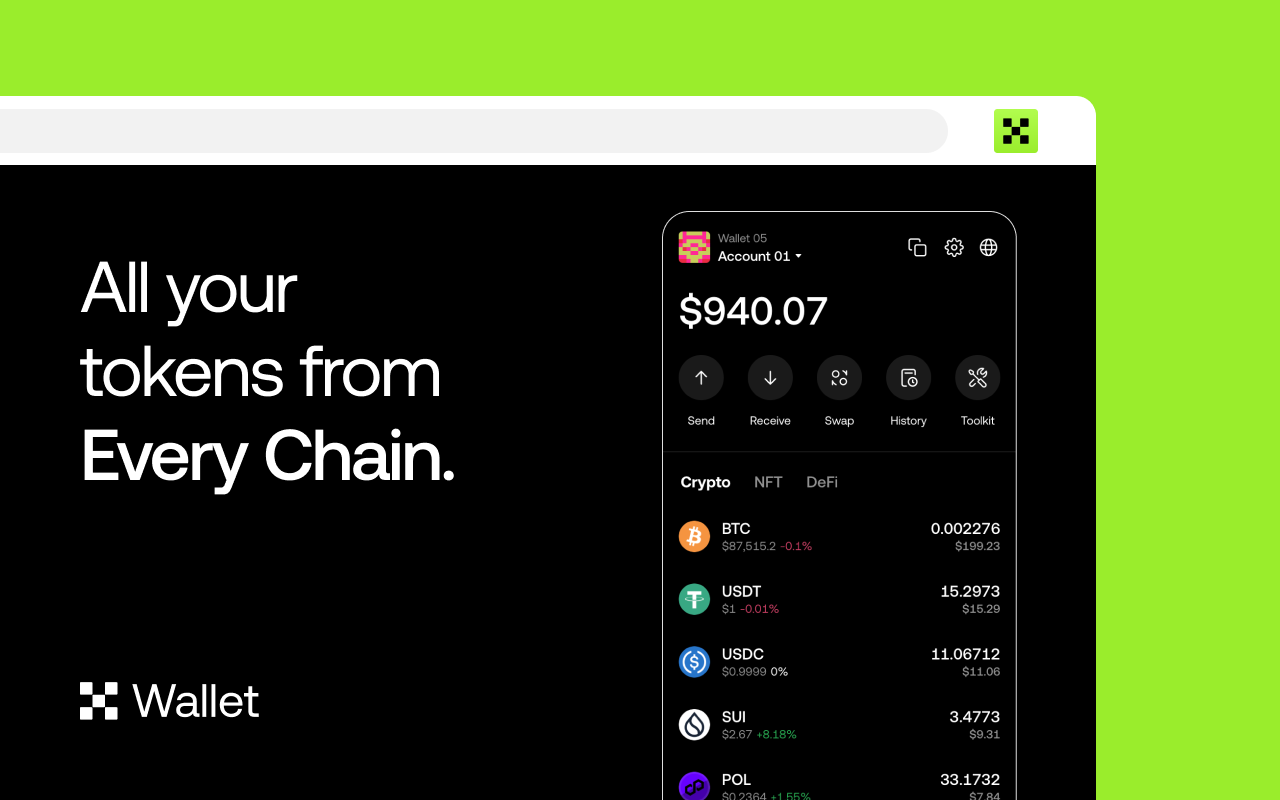
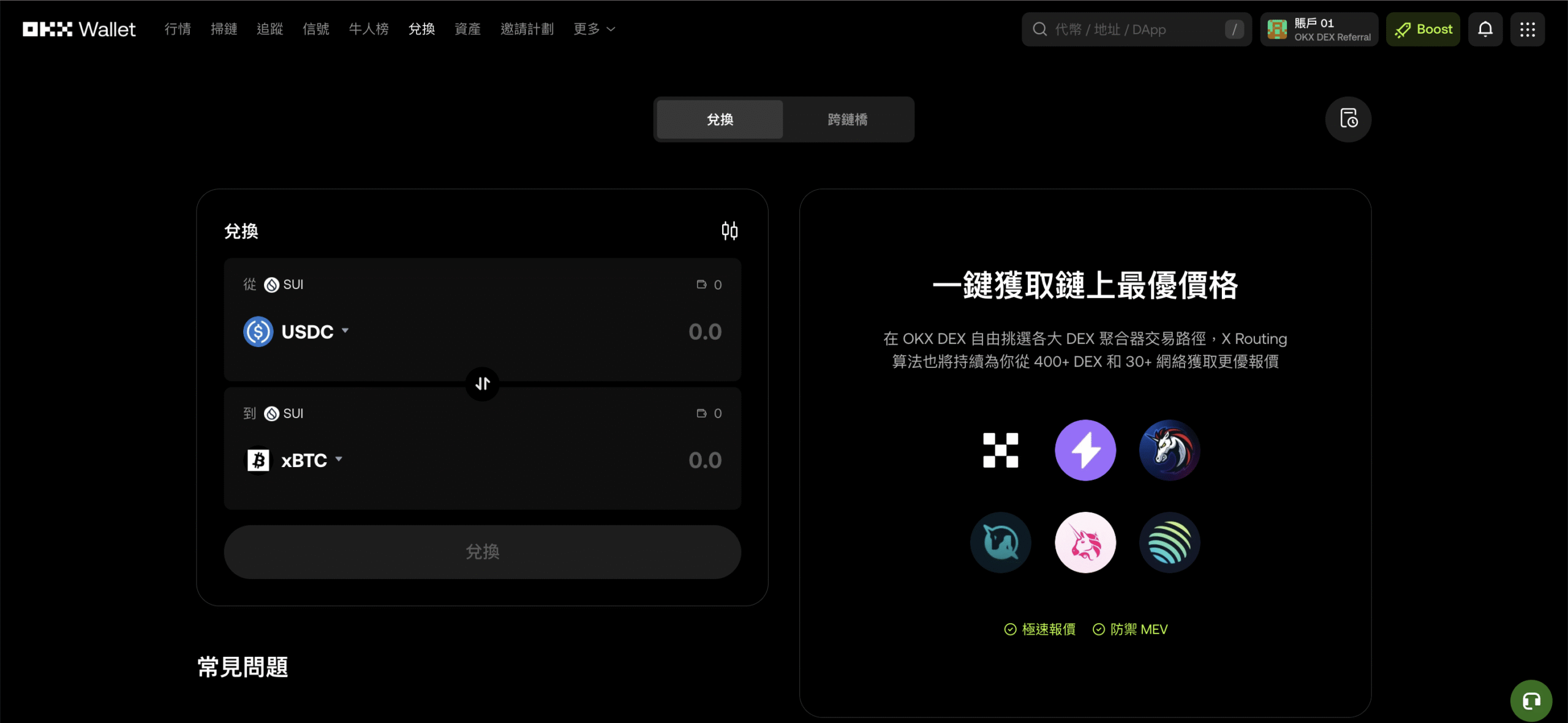
The OKX wallet provides a secure and intuitive way to manage assets, allowing users to transfer exchange funds to the Web3 wallet with a single click and experience decentralized trading without complicated setup. For newcomers, this integration dramatically reduces learning costs and makes managing and trading crypto assets much easier and more efficient. Currently, Wallet supports a variety of chains and functions, including DEX trading, NFT management, DApp interaction, etc., which truly makes it possible for "one app to master the whole Web3".
What are the features of OKX Web3 wallet?
Security:OKX Wallet uses the same encryption algorithm as mainstream decentralized wallets to generate private keys, which ensures that funds will not be accessed without authorization as long as the auxiliary words are properly stored. Meanwhile, OKX Wallet supports multiple identity authentication (e.g. fingerprint, Face ID, etc.) to minimize the risk of phishing or fraud. In addition, all private key data is stored offline and will not be uploaded to the server, ensuring account security.
Ease of use:OKX Web3 Wallet's intuitive interface simplifies the tedious process of online operations. From wallet creation, cross-chain transfers to DApp interactions, all can be done in one app. Even newcomers can easily understand and master decentralized asset management.
Cross-platform compatibility:Supports computers, mobile phones, tablets and other devices.
Multiple Chain Support:Supports more than 50 major public chains, including Bitcoin, Ethereum, Solana, Sui, Base, Arbitrum, and so on. Users can freely switch and operate on different chains to easily manage multi-chain assets and NFTs.
Follow the latest market trends:OKX Wallet integrates with mainstream DApp and NFT markets, allowing users to complete transactions, pledges, and collection management without the need to download additional plug-ins or jump platforms.
The newly launched Boost platform allows users to participate in tasks, complete interactions and earn rewards directly from their wallets. OKX has worked with a number of on-chain projects to design tasks that help users identify effective interactions and improve the efficiency of their participation in NGT and events. Simply put, Boost is a reward base that allows you to participate in the Web3 world "faster, safer, and more efficiently".
Read more:
OKX Boost Airdrop Instruction: Beginner's Guide to Advanced Tattooing Strategy
OKX Boost Aerial Teaching: A Complete Witch-proofing Strategy.
Is the OKX Web3 wallet safe?
- Private key offline storage:OKX Wallet's private key data is only stored in the user's local device and will not be uploaded to any server or cloud, thus eliminating the risk of hacking or data leakage.
- Manage multiple chain assets with one set of helpers:By backing up a single set of helpers, users can manage multiple assets along the public chain at the same time, dramatically reducing the likelihood of loss and operational errors.
- Multi-authentication protection:Wallet supports multiple biometrics such as fingerprint and face recognition, adding an extra layer of security to fund transfers and login operations.
- SkyEye KYC risk control system:Built-in intelligent monitoring mechanism with more than 200 million linked address tags, when users transfer funds or interact with DApp contracts, the system will instantly recognize malicious addresses and potential risks to proactively prevent fraudulent behavior.
OKX Web3 Wallet: Latest Developments in 2026
The OKX Web3 Wallet continued to undergo rapid iterations in 2026, from AI-powered proxy wallets to login without a mnemonic phrase. The official product roadmap is clearly moving toward “greater ease of use and automation.” Here are some of the most notable recent official developments:
- AI Agent Wallet (Agentic Wallet):Officially launched in March 2026, this feature allows AI agents to securely hold digital assets and execute on-chain transactions via natural language commands without the need for manual signatures on a transaction-by-transaction basis, marking a significant step for OKX as it enters the AI space.
- Social Login:Launching in July 2026, new users can create a wallet directly using their email, Google, or Apple account without having to write down a mnemonic phrase. The user experience has been unified across the app, browser extension, and web version.
- Smart Accounts:Built on Trusted Execution Environment (TEE) technology, it offers automated trading and custody solutions that allow users to utilize automated strategies without having to relinquish control of their private keys.
- One-Click Looping Strategies:Updated in September 2026: You can now execute a circular lending strategy with a single transaction, replacing the previous multi-step manual process.
- Boost Task Platform:A one-stop platform for exploring DApps and earning rewards for interaction. We partner with major projects to set up on-chain tasks, helping users interact in the right way to earn rewards and qualify for airdrops.
- Security Feature Upgrades:Integrated the OKX risky address database, added one-click authorization revocation during transactions, and introduced "addresses with similar leading and trailing characters" phishing detection to reduce the risk of being scammed during transfers.
How to register for OKX Web3 wallet in 4 steps?
To get started with OKX Web3 wallet, follow these simple steps:
1. Download wallet:Go to OKX official website to download and install OKX Web3 wallet plugin.Input during registration Monsterblockhk Exclusive Coupon Code "MB001」Enjoy a permanent 10% trading fee discountThe following is a demonstration of the operation process using the mobile phone interface. The following is a demonstration of the operation procedure using the cell phone interface.
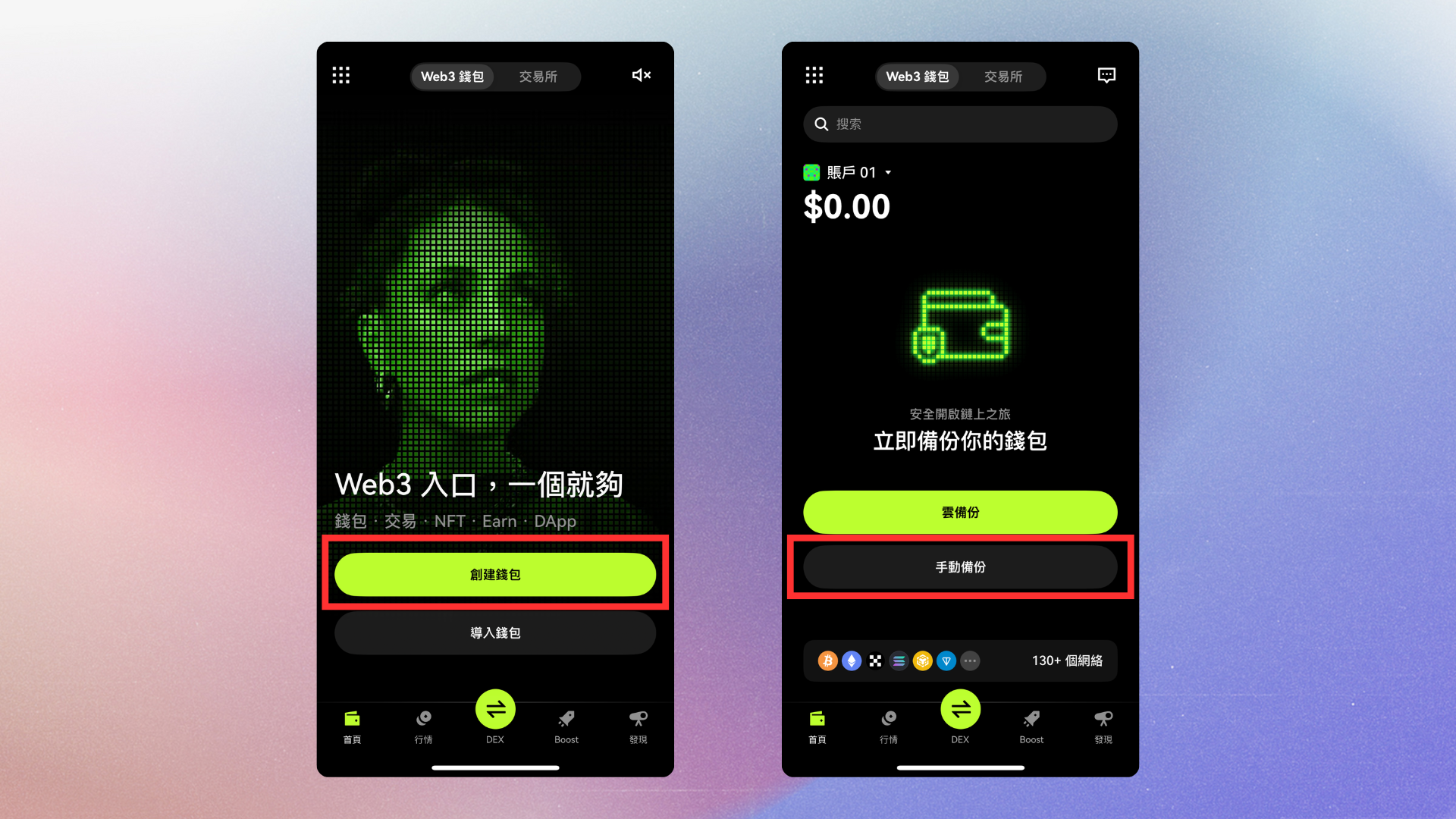
2. Create a new wallet:After opening the App, tap "Create Wallet" and then click "Create Now".
3. Backup wallet:The app does not automatically back up your assets after you create them, so be sure to back up your helpers. This is the only way to recover your assets in the future if you lose your device or forget your password.(I suggest readers not to use iCloud backup, because it's always safest to write it down manually!)
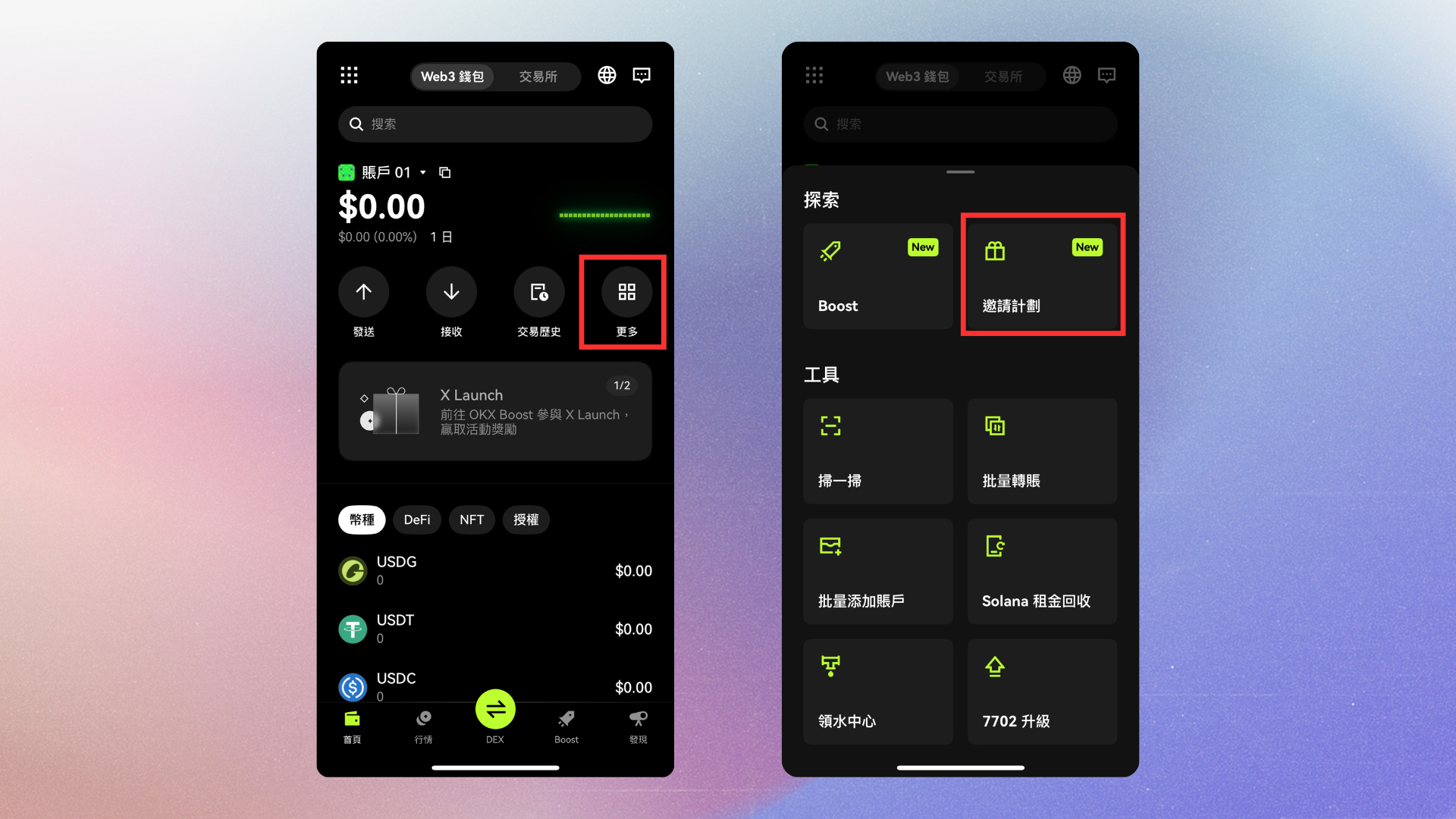
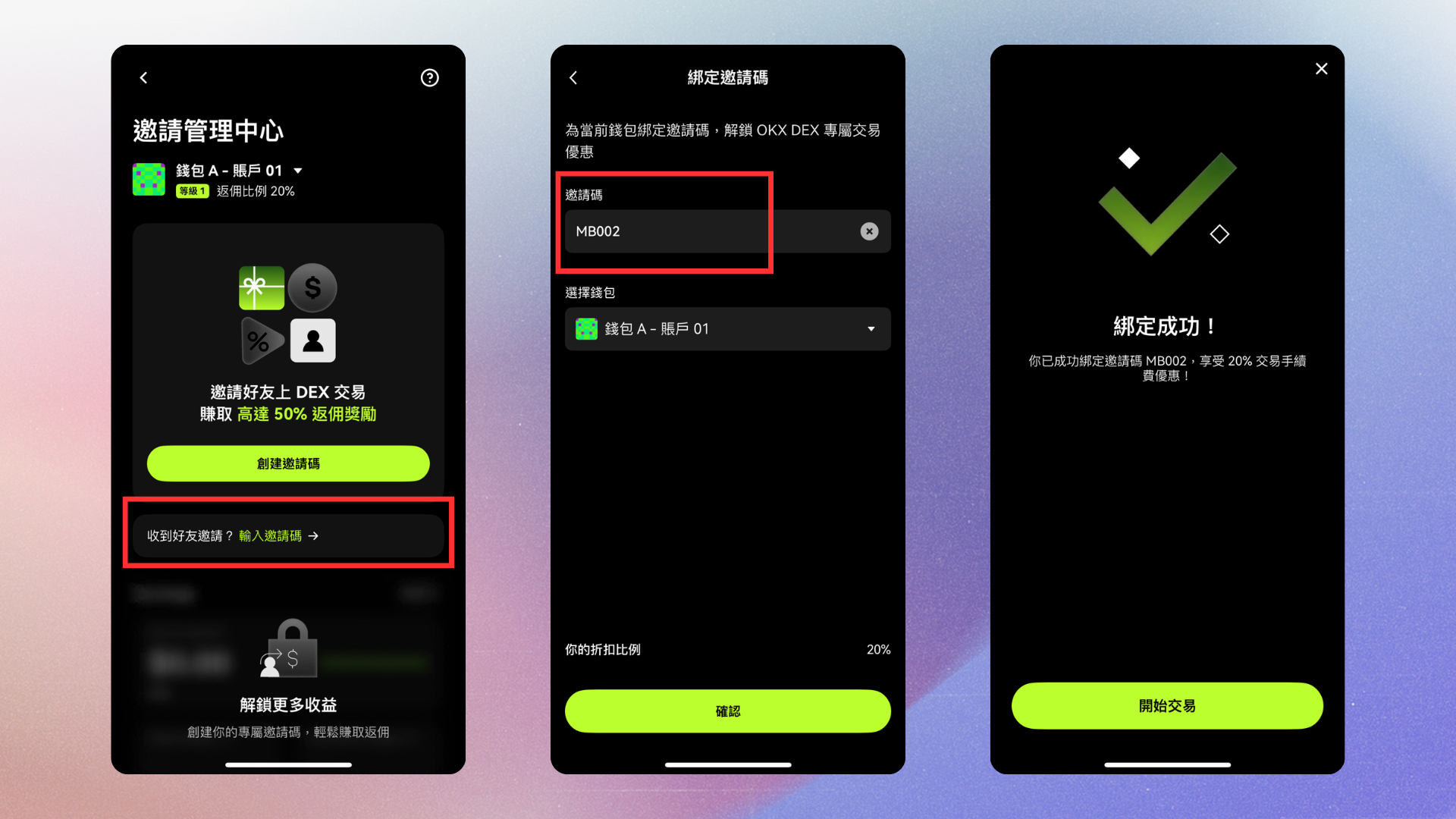
5. What should I do if I forgot to fill in the invitation code? If you did not enter the invitation code when you registered, you can fill in the invitation code in the App "More" → "Invitation Program".Enter the code "MB001" to enjoy a discount on the 10% processing fee!
See the following pictures for a complete step-by-step demonstration:
6. How to deposit funds from an exchange or other platform:
- Click "Receive" on the main page of the App and select the currency you want to receive (e.g. USDT, ETH, etc.).
- Choose a coin-raising network (e.g. ERC20, Tron, or Arbitrum).
- Copy the OKX Web3 wallet address and paste it into the exchange's coin withdrawal page.
- Confirm the chain is correct and send out the coins, which will be credited to your account in a few minutes.
Addendum: Click the icon in the upper left corner of the Wallet homepage to access the Settings page to adjust various security and preference options, including adding or managing multiple wallets, modifying security rules, setting a whitelist, and switching the interface language.
OKX Web3 Wallet FAQs
Q1:Do I need to pay for OKX Wallet?
No. The OKX Web3 wallet can be downloaded and used for free, without any activation or subscription fees. However, there is still a small blockchain network gas fee, which is charged by the blockchain itself, for transfers, exchanges, or on-chain operations.
Q2:Do I need to pay for OKX Wallet?
Through MB001 Referral Code Sign up to enjoy a permanent 10% DEX trading fee discount. The discount is valid for life, with no trading volume restrictions.
Q3:What currencies can be stored in OKX Wallet?
OKX Wallet supports multi-chain assets, including mainstream public chains and tokens, such as Bitcoin, Ethereum, Solana, BNB Chain and so on. Simply put, most of the major currencies and emerging tokens can be managed in OKX Wallet.
Q4: Can I use the same wallet on different devices?
Yes, you can synchronize the same wallet across multiple phones or computers as long as you import with the same set of helpers. However, please note that it is recommended that you only log in on trusted devices and ensure that your helpers are kept securely to prevent them from being accessed by others.
Q5:What should I do if I forget my password?
If you forget your login password, you can recover your wallet by using the helpers you backed up when you created your wallet. The mnemonic is the only way to recover your assets, so be sure to save it offline, don't take a screenshot or upload it to the cloud.
Q6:Can OKX Wallet connect with Hard Wallet?
OKX Web3 wallet supports integration with Ledger and other major hardware wallets. Currently, OKX Web3 wallet supports integration with Ledger and other major hardware wallets, allowing users to easily manipulate assets on the chain while maintaining high security.
Q7:Can I get rewards for using the wallet?
OKX's Boost platform has been integrated into the wallet, allowing users to participate in X Launch tasks, interact with DApps, and earn rewards directly from the app, making it the most convenient one-stop Web3 task and motivation center available.
Q8:What will happen to the assets of OKX Web3 Wallet if my cell phone is lost?
Assets are stored on the blockchain, not on OKX's servers. With a 12-24 character token, you can reload your wallet on the new machine and your assets will be restored automatically. The token is the only proof of access, so if you lose it, you lose your assets permanently.
Disclaimer
The content of this article is for reference only, investors should exercise independent judgment, invest prudently and at their own risk, this article does not provide or attempt to persuade the audience to do trading or investment basis, the content is for sharing purposes only, and should not be regarded as investment advice.It does not represent the views and position of Monsterblockhk.All information and opinions are current as of the date of the judgment. In addition, if a judgment is rendered on aIn this siteAny content related to virtual asset trading platforms that have not yet obtained a license to operate virtual asset trading platforms in Hong Kong, including but not limited to text introductions, pictures, offers, events, etc., are only available to users outside the Hong Kong Special Administrative Region.
According to the Hong Kong Anti-Money Laundering and Counter-Terrorist Financing (Amendment) Ordinance 2022, after June 1, 2023, all centralized virtual asset trading platforms operating in Hong Kong or actively promoting their services to Hong Kong investors will be licensed and regulated by the SFC, and any related unlicensed activities will be a criminal offence. For more information and details of the legislation, users may refer to the SFC website.