
What is OpenRouter? Why can it be used to switch models for Claude Code?
Claude Code is an AI programming assistant developed by Anthropic that can read and write files on its own, execute terminal commands, and help you write and debug code. Its design consists of two layers:
- Framework Layer: Autonomous decision-making loops, tool invocation, file operations, and terminal control—these are the core capabilities of Claude Code itself.
- Model Layer: The language model responsible for the underlying reasoning. Click Claude Code Official Documentation, Pro, Max, and API users currently use Claude Opus 5.5 by default
The two layers communicate via a standard API; as long as the API address points to another compatible service, the framework will continue to function normally, while the underlying model can be replaced.OpenRouter This is exactly the kind of service: a single API key can provide access to models from hundreds of different providers, including those marked as “free.” OpenRouter also offersOfficial Claude Code Setup Guide, The setup steps in this article are based on this document.
In terms of cost, Claude’s official Pro plan is $20 per month, and the Max plan starts at $100 per month (Claude Official Pricing Page), while the free version does not include Claude Code. After switching to OpenRouter, you’ll only pay for what you actually use, and you can even try it at no cost by selecting the free model.
Regional Restrictions Hong Kong Users Should Know About First
Before getting started with the setup, readers in Hong Kong should first understand three things:
- Official from AnthropicList of Supported RegionsExcludes Hong Kong and Macau.
- OpenRouter Terms of ServicePlease note that some model providers do not allow users in certain countries or regions to use their models, and providers may update the list of restricted models at any time. In other words, when the Claude series of models are invoked via OpenRouter, they are also subject to Anthropic’s regional policies and may be rejected or violate the provider’s terms of service.
- Anthropic's region-specific pages list Claude Code itself as a product subject to regional policies,Official Legal PageIt also specifies that regardless of the platform used, Claude Code is governed by Anthropic’s standard terms and conditions. Even if you simply switch models and do not use the Claude model, running the Claude Code software in Hong Kong is still not considered an officially supported use under those terms.
Therefore, the approach demonstrated in this article involves using the Claude Code framework in conjunction with non-Anthropic models (free or low-cost) on OpenRouter. For users in Hong Kong, this approach falls into a gray area, and users assume all risks themselves; this article does not teach any methods for circumventing regional restrictions. For the full details of regional policies and other options available to users in Hong Kong, please refer to Claude Code Hong Kong User Guide. The terms and conditions of each platform are subject to change at any time. Please review the latest version before use; the official announcement shall prevail.
OpenRouter Setup Guide for Claude Code
The entire setup requires only three environment variables; no additional proxy software needs to be installed. The steps below apply to macOS and Linux; Windows users can follow the installation instructions for the WSL or PowerShell versions.
Steps 1–3: Sign up, obtain an API key, and install Claude Code
- Sign up for OpenRouter: Go to openrouter.ai, Follow the on-screen instructions to create an account. Registration is free.
- Create an API Key: After logging in, go to the "Keys" page in your account settings (openrouter.ai/settings/keys), click "Create Key," and copy the key that begins with "sk-or-." This key will only be displayed in full once, so please keep it safe and do not upload it to GitHub or share it with others.
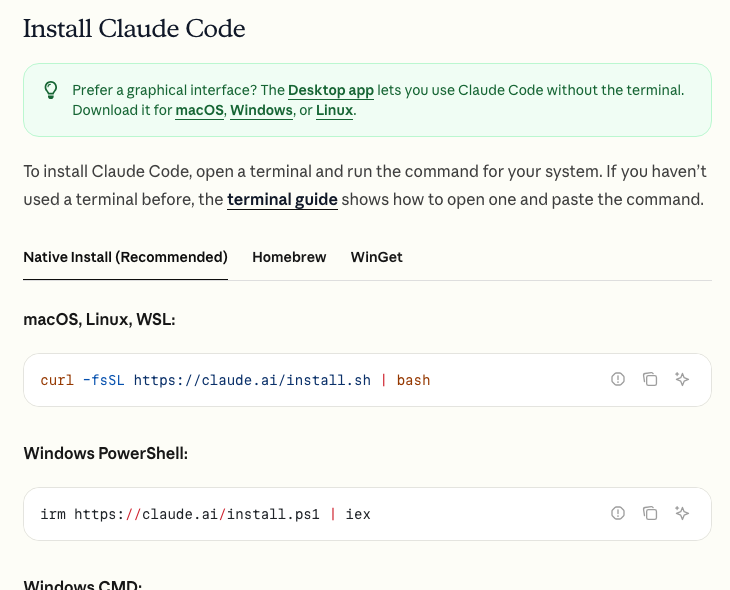
- To install Claude Code: Open the terminal and enter the official native installation command (for Windows PowerShell commands, see the official OpenRouter tutorial).
curl -fsSL https://claude.ai/install.sh | bash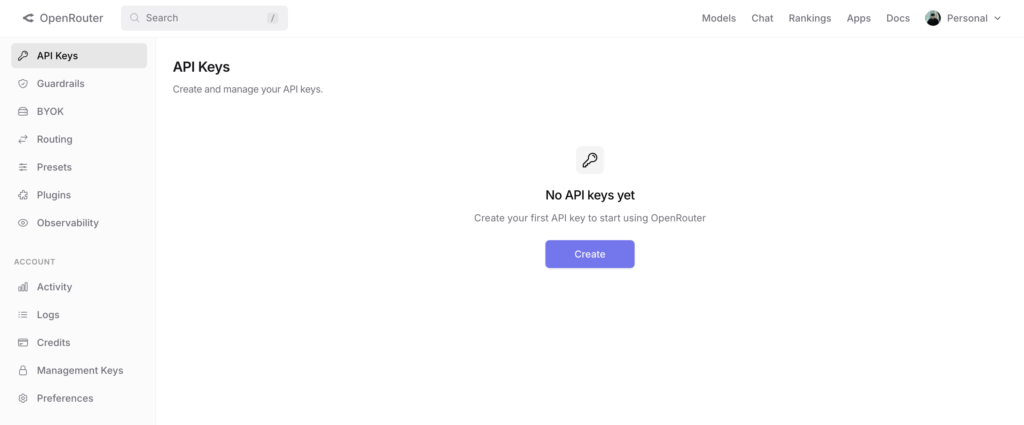
The video below is a setup demonstration recorded by MB some time ago. Some of the interfaces and steps (such as Antigravity) differ from the latest instructions in this article; please refer to this article for the actual setup instructions.
Steps 4–6: Set Environment Variables, Log Out of the Old Account, and Verify the Connection
- Set the environment variables: Add the following four lines to ~/.zshrc (or ~/.bashrc if you're using bash), and replace the text inside the quotes with your OpenRouter API key.
export OPENROUTER_API_KEY="Your OpenRouter API Key"
export ANTHROPIC_BASE_URL="https://openrouter.ai/api"
export ANTHROPIC_AUTH_TOKEN="$OPENROUTER_API_KEY"
export ANTHROPIC_API_KEY=""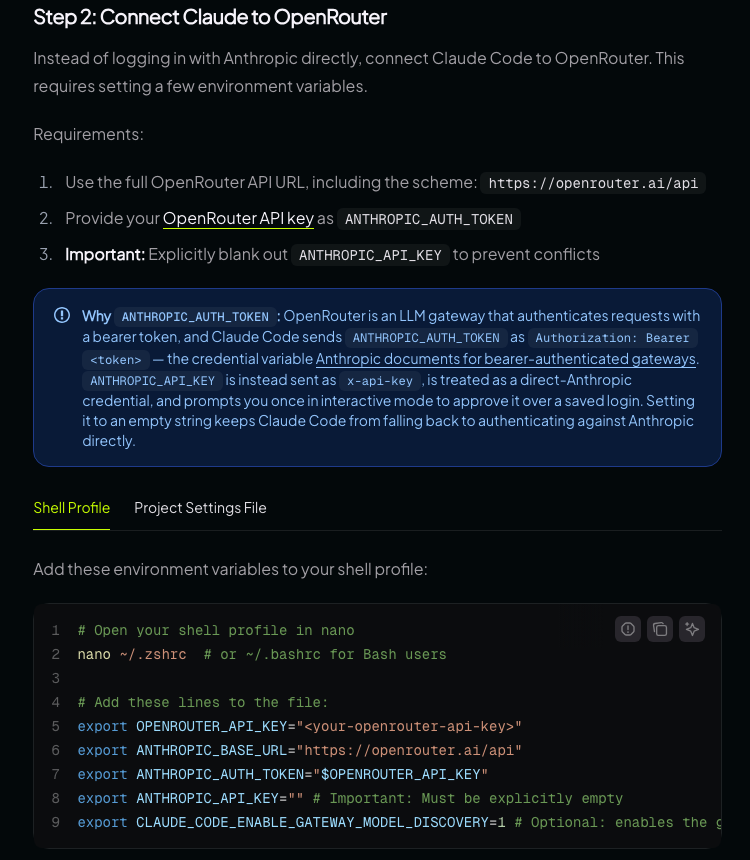
- Reload and log out of the old account: After saving, enter `source ~/.zshrc`, or simply open a new terminal. If you’ve previously logged into Claude Code with a Claude account, enter `/logout` after launching the program, then close and restart claude; otherwise, the program will continue to use the old login credentials.
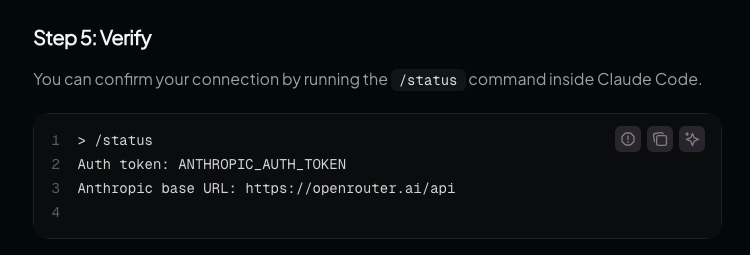
- Verify the connection: In the project folder, type `claude` to start the program, then type `/status`. If the screen displays an Auth token of `ANTHROPIC_AUTH_TOKEN` and an Anthropic base URL of `https://openrouter.ai/api`, it means you are connected to OpenRouter.
The three most common mistakes when configuring:
- ANTHROPIC_API_KEY must be explicitly set to an empty value (with nothing between the two quotation marks); do not simply delete it, otherwise Claude Code may switch to using the Anthropic account for authentication.
- OPENROUTER_API_KEY must be placed before the line containing ANTHROPIC_AUTH_TOKEN. The official documentation notes that if the order is reversed, the token will be blank, and every request will result in an authentication error.
- Do not put your settings in the .env file; Claude Code will not read it. If you only want to use these settings for a single project, create a .claude/settings.local.json file in the project's root directory and enter the same values in the `env` block.
Once the setup is complete, start by asking a simple question using the free model, then go to the Activity page in OpenRouter to verify that the request has been logged before you begin working on your actual project.
Want to use it in VS Code?
Claude Code has an official VS Code extension, and VS Code-based editors such as Cursor can also be installed from the extension marketplace. ClickOfficial VS Code Documentation, when using third-party services such as OpenRouter:
- Add the environment variables listed above to the `env` section of `~/.claude/settings.json` so that the extension and the terminal version share the same configuration.
- Check the "Disable Login Prompt" box in the VS Code settings to skip the Anthropic account login screen.
If you can't install the extension, you can also type "claude" directly into the editor's built-in terminal; it will have the same effect.
How do I switch models?
After connecting to OpenRouter, Claude Code still uses the three "model slots"—opus, sonnet, and haiku—to distribute tasks internally. You can use environment variables to specify which OpenRouter model each slot should actually use:
export ANTHROPIC_DEFAULT_OPUS_MODEL="nvidia/nemotron-3-super-120b-a12b:free"
export ANTHROPIC_DEFAULT_SONNET_MODEL="cohere/north-mini-code:free"
export ANTHROPIC_DEFAULT_HAIKU_MODEL="openrouter/free"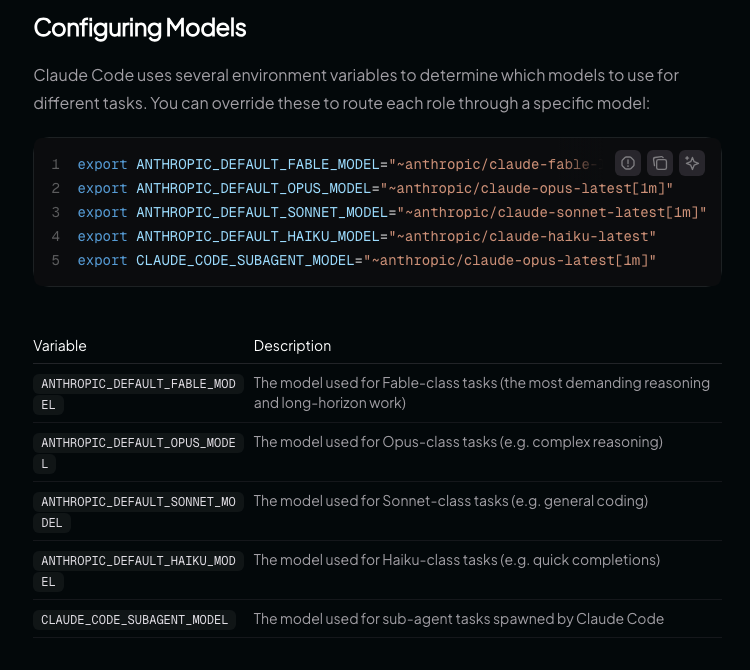
- Copy Model ID: Copy the full ID from the OpenRouter model page; IDs for free models end with :free.
- Configuration: Enter the IDs into the three variables above, save the file, and then reload the terminal.
- Switch Models at Any Time: Type /model in Claude Code to open the menu, or type /model followed by a model name to switch models instantly; you can also specify the model to use by running claude –model when starting the application.
- Open the Models menu: After adding `export CLAUDE_CODE_ENABLE_GATEWAY_MODEL_DISCOVERY=1`, the /model menu will list the models on OpenRouter.
Note: The "/model openrouter,model_name" syntax found in older tutorials is the format used by a different third-party tool, Claude Code Router. It is not compatible with OpenRouter, and using it as is will result in an error.
To switch back to the official Claude account, simply delete the environment variables mentioned above, reload the terminal, and then log in using `/login`.
Currently Available Free Models (Updated October 6, 2026)
The list of free models on OpenRouter changes rapidly. The free version of DeepSeek, which was still being recommended in the first half of 2026, is no longer on the free list; only the paid versions of the DeepSeek series remain. The following list is taken from OpenRouter’s official model API as of October 6, 2026, and includes only models that support tool calls (Claude Code required):
| Model ID | Features | Recommended Uses |
|---|---|---|
| openrouter/free | An official free router that automatically selects a free model based on the requested features (such as tool calls). | First-time test for beginners—no need to choose a model yourself |
| cohere/north-mini-code:free | Cohere's first agent programming model, with 256K context | Writing code, fixing bugs |
| nvidia/nemotron-3-super-120b-a12b:free | 120 billion parameters; officially positioned as a multi-agent application | More complex, multi-step tasks |
| google/gemma-4-31b-it:free | An open-source model from Google DeepMind that supports function calls and image input, with a 256K context size | General Programming and Word Processing |
| poolside/laguna-s-2.1:free | Programming model, but OpenRouter is scheduled to be discontinued on October 31, 2026 | Suitable only for short-term trials |
The list of free models changes every few weeks. Please visit OpenRouter Free Model Page Make sure the model is still listed. If a model suddenly starts showing errors, the simplest solution is to switch to `openrouter/free` and let the router choose for you.
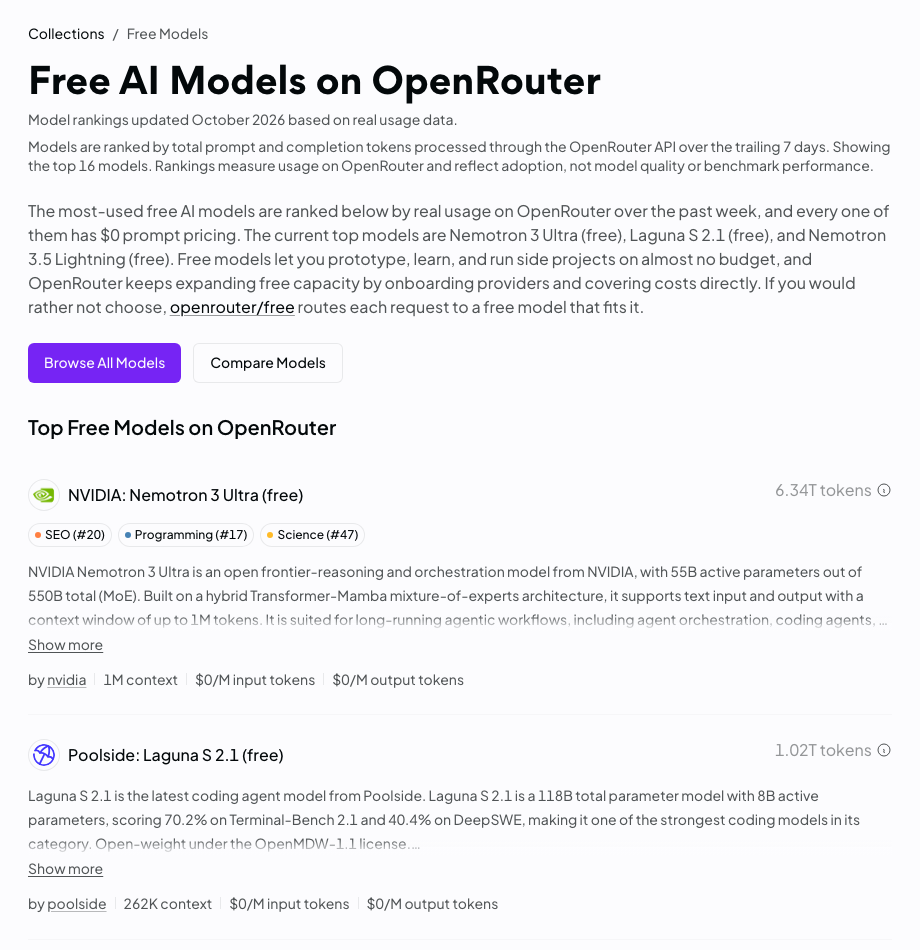
OpenRouter's terms also state that some providers do not offer services in certain regions, so the list you see on the model page may differ from the table above; the information displayed in your account is final.
How much is the free allowance? Daily usage limits
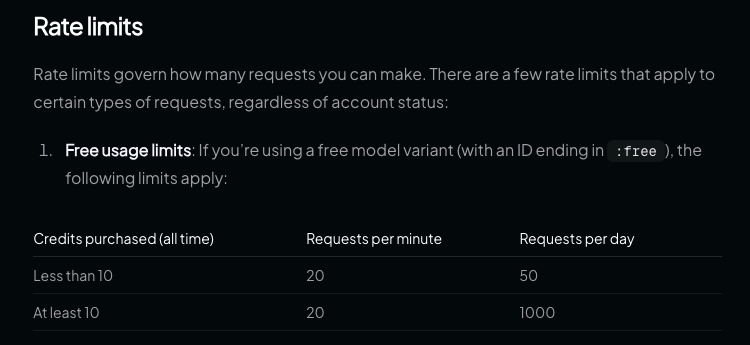
按 OpenRouter Official Restriction File, All models ending with :free are subject to the following limits:
| Account Status | Maximum Requests Per Minute | Daily Request Limit |
|---|---|---|
| Total credits purchased: less than 10 | 20 times | 50 times |
| Total purchases of 10 credits or more | 20 times | 1,000 times |
A few things to keep in mind:
- The daily limit is calculated for the entire account, not separately for each model, and resets at midnight UTC (8:00 a.m. Hong Kong time).
- As long as you have purchased a total of 10 credits, the daily limit of 1,000 requests will remain in effect even if your balance is subsequently depleted. Using the free model will not deduct from this balance.
- To complete a task in Claude Code, you often need to make multiple consecutive requests (each file read, file edit, and command execution counts as one), so the daily limit of 50 requests is used up quickly. If you plan to use it frequently, it makes more practical sense to top up your account with $10 first.
Which model should you choose for different applications?
- Learn and Try It Out: Use openrouter/free or one of the free models listed in the table above to learn how Claude Code works at no cost.
- Personal Project: Consider low-cost subscription models on OpenRouter, such as deepseek/deepseek-v4-flash, z-ai/glm-5.3-flash, minimax/minimax-m3, and qwen/qwen3-coder-next. According to the official list as of October 6, 2026, the input prices for these models from major providers are mostly between $0.1 and $0.3 per million tokens; please refer to the real-time display on the model pages for the most up-to-date information.
- Professional Development: If the quality of your code directly affects your income, the time spent fixing errors may end up costing more than the tool itself; the official Claude solution or the native Claude model remains the more stable choice. For reference, the listed price for Claude Sonnet 5.5 on OpenRouter is $2 per million input tokens and $10 per million output tokens. However, calls to the Claude model via OpenRouter are also subject to Anthropic’s regional support policies, and Hong Kong is not included in the supported regions.
- Mixed Configuration: Set the "opus" and "sonnet" positions—which require more complex processing—to more powerful models, and set the "haiku" positions—which handle simpler tasks—to "openrouter/free." This allows you to strike a balance between quality and cost.
Once you've set everything up, if you want your AI assistant to handle more daily tasks, you can refer to Openclaw Lobster AI Beginner's Guide。
Four Trade-offs of Free Services
Zero cost is indeed possible, but you need to be aware of the trade-offs involved:
- Performance Gap: Code generated by free models generally has a higher error rate. The official OpenRouter documentation also notes that Claude Code is optimized for Anthropic models and may behave abnormally when used with other models. This has little impact on students or amateur developers, but if you charge by the hour, the extra time spent on corrections represents a hidden cost.
- Unreliable tool invocation: Claude Code relies on the model to invoke tools in a fixed format. Some alternative models occasionally produce formatting errors, causing operations to fail and requiring retries; while this has little impact on single-step tasks, multi-step tasks are more likely to be interrupted.
- Usage and Speed Limits: Free models have a daily usage limit. During peak hours, you may experience wait times or temporary unavailability. Additionally, the list of available models is subject to change at any time; models that were available last week may no longer be available this week.
- Data Passes Through a Third Party: Your code will be routed through OpenRouter to the model provider. OpenRouter states that it will not log your prompts unless you actively enable logging in your account settings; however, some providers of free models may use the input data to train their models. OpenRouter’s privacy settings allow for separate control over free and paid models. This is generally not a problem for personal projects, but we do not recommend processing proprietary company code or sensitive data through free models.
Another helpful tip: Press Claude Code Official DocumentationClaude Code’s web scraping feature (WebFetch) sends the domain name to api.anthropic.com for a security check before fetching the URL; this step is performed regardless of which model provider you use. If your network cannot connect to that domain, the web scraping will fail. The official workaround is to add `skipWebFetchPreflight: true` to `settings.json`, but this will also disable security blacklist checks.
To learn more about how AI agents integrate with the crypto market, you can read A Comprehensive Analysis of the AI Agent Economy。
Frequently Asked Questions
Is OpenRouter really free to use?
Yes. Models ending in :free are free of charge and can be used even with a zero account balance, but are limited to 50 requests per day; after purchasing a total of 10 credits, the daily limit increases to 1,000 requests. Paid models are billed based on actual token usage.
Can I use OpenRouter to connect to Claude Code in Hong Kong?
Technically, the setup steps are the same as in other regions. However, Anthropic’s officially supported regions do not include Hong Kong, and OpenRouter’s terms of service specify that some providers restrict users in certain regions. Therefore, accessing Claude-series models via OpenRouter may result in rejection or a violation of the terms of service. Even if you switch to a non-Anthropic model, Anthropic’s supported regions page includes the Claude Code software itself within the scope of its regional policies. Therefore, using it in Hong Kong falls into a gray area, and users assume all risks. Please review the latest terms of service for each platform before use.
Why does training the DeepSeek free model using the default settings fail?
Since the free version of DeepSeek is no longer included in OpenRouter’s free list, the model IDs in the old tutorials are no longer valid. Additionally, “/model openrouter,model_name” is the syntax used by Claude Code Router; when connecting directly to OpenRouter, you should use the full model ID or specify it using environment variables such as ANTHROPIC_DEFAULT_SONNET_MODEL.
Will the chat history disappear after switching models?
No. Claude Code stores conversation logs as plain text in the ~/.claude/projects/ folder on your computer. By default, they are retained for 30 days, regardless of which model you use.
When I enter /status, it still shows the Claude account. What should I do?
This indicates that the environment variables were not passed to Claude Code. First, make sure that ANTHROPIC_API_KEY is set to an empty value, reload the terminal, then enter /logout in Claude Code, close it, and restart it. If you’re using macOS and the issue persists, old login credentials may still be stored in the Keychain. The official documentation explains how to clear them.
Next Step
We recommend starting with a small project using openrouter/free to see if the AI programming assistant truly boosts your efficiency before deciding whether to top up your account or upgrade to a paid plan. The tool that’s best for you isn’t necessarily the most expensive or the cheapest—it’s the one that best solves the problems you’re facing.
The list of free models changes every few weeks, and MB will update this article regularly. If you want to know about the latest available models and configuration tips, feel free to join our community to discuss, or you can read A Comprehensive Analysis of GPT Image 2.5, learn how to use another popular AI tool.
Disclaimer
The content of this article is for reference only, investors should exercise independent judgment, invest with caution and at their own risk, this article does not provide or attempt to persuade viewers to trade or invest on the basis of the content of this article is for sharing purposes only, and should not be regarded as investment advice, and does not represent the Monsterblockhk viewpoints and positions, all information and views of the specific date of the judgment of the time-limited nature. In addition, if any content in this website involves virtual asset trading platforms that have not yet obtained a license to operate virtual asset trading platforms in Hong Kong, including but not limited to text introductions, pictures, promotions, events, etc., they are only available to users outside of the Hong Kong Special Administrative Region.
According to the Hong Kong Anti-Money Laundering and Counter-Terrorist Financing (Amendment) Ordinance 2022, after June 1, 2023, all centralized virtual asset trading platforms operating in Hong Kong or actively promoting their services to Hong Kong investors will be licensed and regulated by the SFC, and any related unlicensed activities will be a criminal offence. For more information and details of the legislation, users may refer to the SFC website.