Tracking the change of large account position data is a must-have skill in the currency circle, now many people are in the data site to get the whale's address, and then go to the browser to search for its address position data and transfer records and other information; of course, some people also use Whale Alert's alert to remind, and I'm going to introduce you to a better use of address tracking visualization tool Bubblemaps.
一、Go to official website:https:// app.bubblemaps.io/eth/ Connecting the wallet.Enter the token name or address and search for it.
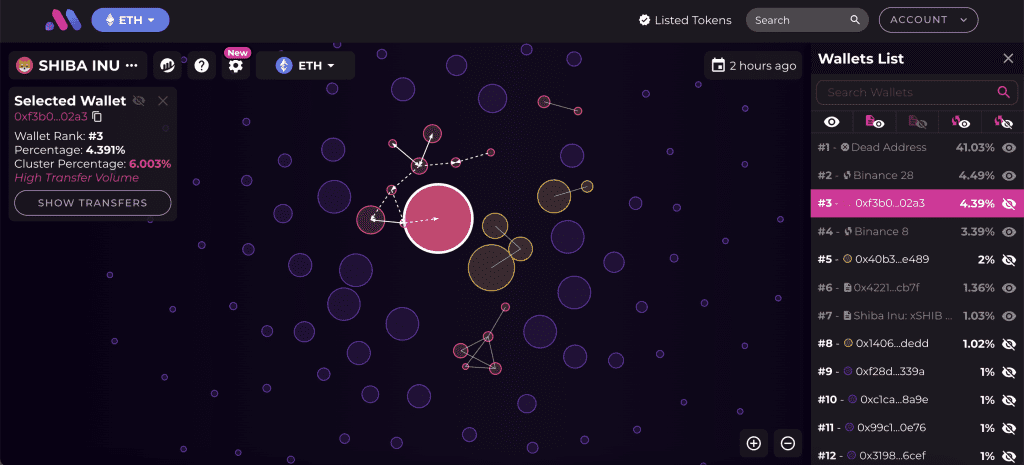
Bubblemaps present the distribution of tokens or NFTs in bubbles of different sizes, with arrows connecting the associated addresses, helping to identify the correlation between large wallets.
Take $SHIB as an example.
- Public Chain Options ETH
- Search for $SHIB in the search bar.
- The right-hand column shows the ranking of addresses held and their share of the total number of shares.
- The vapor packets in the middle represent each address that holds the currency. If there is a line between the two addresses, it means there is a transaction going on.
Three,Click on the address with the most relationships in the center (above)
You can see that this address corresponds to the 3rd ranked wallet in the right column, and there are currently 3 addresses directly associated with it and 5 indirectly.
If an item is associated with more and more complex addresses, it means that large addresses may be engaged in decentralized wallet shipping operations.
Clicking on any bubble will show its ranking in the right hand column, just pull down the right hand column!
IV. SHOW TRANSFERS
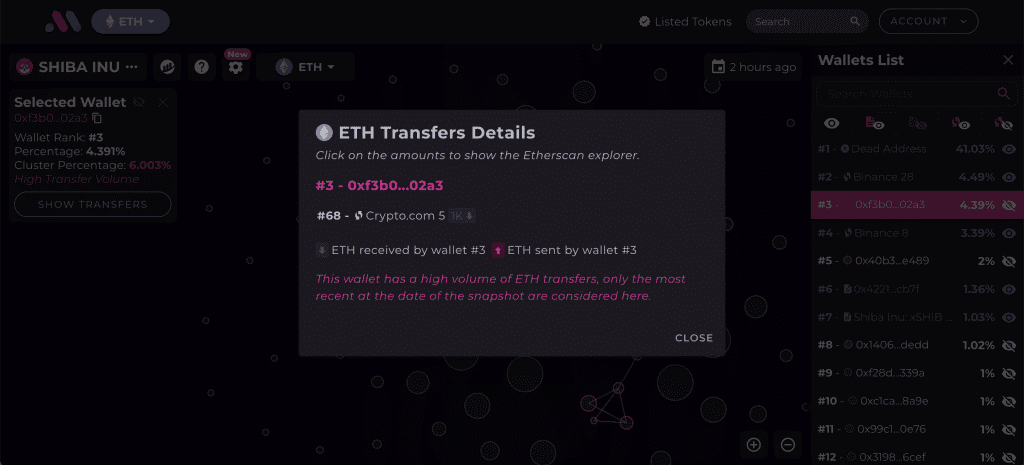
Click on "SHOW TRANSFERS" in the upper left corner to view ETH transactions for that address and other accounts.
V. Hitting the SHOW TRANSFERS
We can see the transaction history of the address with 2 direct accounts; the green arrows represent incoming transactions, the red ones represent outgoing transactions, and the quantity is the total number of transactions.
Six,On-Link Information Inquiry
If you want to see specific information about each transaction in the chain, you can click on the green or red buttons to jump to the transaction history of both accounts on Etherscan.